Free Home Interior Canvas Mockup PSD
What's Inside This PSD File
- Residential Setting — Cozy, Bright Living Space
- Professional PSD File — Fully Organized Layers
- Smart Object Enabled — 1-Click Design Swap
- High Resolution — 300 DPI Print & Digital Ready
- Natural Daylight — Clean & Bright Aesthetic
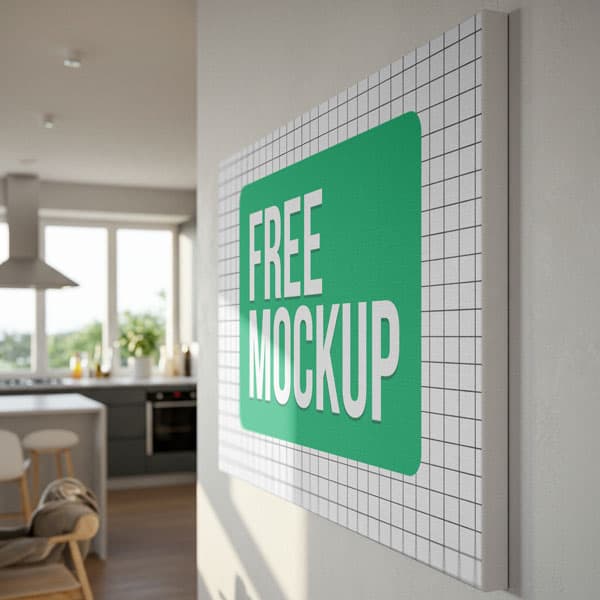
Showcase your art prints and photography in a professional, cozy setting. This free home interior canvas mockup features a bright, naturally lit living space, providing an aspirational atmosphere for home decor brands, digital artists, and photographers.
Bring Your Art to Life in a Realistic Setting
Buyers want to see how art fits into their daily lives. This high-resolution interior mockup transforms your flat digital files into a photorealistic exhibit. Set against a clean, daylight-illuminated living room wall, your prints—whether they are landscape photography, modern typography, or abstract illustrations—will gain an immediate sense of scale, professionalism, and domestic warmth.
How to Use This PSD
Designed for creators, our mockup makes professional art-styling simple. Just open the PSD in Photoshop, double-click the Smart Object layer, drop your design onto the canvas, and save. The mockup automatically applies realistic shadows and textures, ensuring your art looks like it’s actually hanging on the wall.
Best Use Cases
Perfect for art print e-commerce shops, interior design portfolios, photography brand lookbooks, and social media marketing for home decor.
How to Use This Wall Canvases
Follow these 4 simple steps to place your design on this mockup in Adobe Photoshop CS6+:
- 1Download the PSD file — Click the Download button above. Save it to your computer.
- 2Open in Adobe Photoshop — Go to File > Open and select the PSD file.
- 3Double-click the Smart Object layer — Look for “Your Design Here” or similar. Double-click its thumbnail.
- 4Paste your design and save — Place your artwork, then press Ctrl+S (Windows) or Cmd+S (Mac). Done!
Don't Have Photoshop? We'll Place Your Design For You — Starting at $5
No Photoshop? No problem. Send us your design and we'll place it into this mockup for you. You get a finished, ready-to-use image — delivered within 24–48 hours.
No Photoshop Needed
Just send us your design file (PNG, JPG, AI, or PDF) and we'll do the rest. You get a polished mockup image back.
Fast Delivery
Most orders are done within a few hours. Need it urgent? Let us know and we'll prioritize yours.
Bulk Orders Welcome
Need 10, 20, or 50 designs placed into the same mockup? We offer discounted rates for bulk orders.
Starting at $5 per design • Bulk pricing available • Delivery in 24–48 hours
Why Use This Wall Canvases?
Here is why designers and brands choose this mockup:
- Aspirational home decor vibe — Presenting your art in a naturally lit, beautiful room allows customers to immediately visualize the piece in their own living space.
- Save on interior styling — Achieve high-end lifestyle photography results without the time, expense, or logistical challenge of staging a real room.
- Professional ambient lighting — The PSD file is calibrated to blend your design with the room's natural daylight and soft shadows for maximum photorealism.
- Tailored for decor brands — The neutral, bright layout is explicitly designed to handle art prints, quotes, and photography, keeping the focus on your work.
- Professional-grade clarity — The high-resolution file preserves the fine detail of your brush strokes, textures, and typography at any display size.
Frequently Asked Questions
Is this interior canvas mockup free to use?
Yes! This template is 100% free for use in your personal design portfolios and commercial art print stores.
How do I add my own art design?
Open the PSD, find the 'Smart Object' layer, double-click to open, paste your artwork, save, and close.
Can you handle the art placement for me?
Yes! If you are not a Photoshop user, I offer a professional mockup insertion service starting at just $5. Contact me on WhatsApp!
Is this mockup good for e-commerce listings?
Absolutely. It is a highly recommended tool for creating professional, eye-catching imagery for Shopify, Etsy, and independent art websites.
Do I need Adobe Photoshop?
Yes. This template uses advanced smart object layers for professional perspective mapping, requiring Photoshop CS6 or any newer version.
Need a Custom Mockup for Your Own Product?
Send us your product photo and we will convert it into a fully editable PSD mockup with smart object layers — starting at just $15. Delivered in 24–48 hours with unlimited revisions.
Get a Custom Mockup — From $15